
How to Launch a Facebook Ad Campaign: A Step-by-Step Guide
Launching an advertising campaign on Facebook can connect your business with a vast audience. This guide provides a clear, step-by-step process for creating, configuring, and publishing your first ad, from initial setup to final review.

Sections
Prerequisites for Running a Facebook Ad
Before creating your first ad, a few foundational elements must be in place. Ensuring these are ready will streamline the campaign setup process and contribute to better results. Proper preparation is key to an effective advertising launch.
1. A Facebook Business Page
Advertisements are run through a business Page, not a personal profile. Your Page acts as the public identity for your business. It should include your business name, contact information, and a logo or profile picture to build trust with potential customers.
2. Access to Ads Manager
Facebook Ads Manager is the central hub for creating and managing all ad campaigns. You can access it directly through your Facebook account. While a Business Manager account is useful for larger teams or multiple ad accounts, Ads Manager is sufficient for beginners running ads for a single Page.
3. A Valid Payment Method
You must have a payment method, such as a credit card or PayPal account, linked to your ad account. Facebook requires this to charge for ad placements. You can set spending limits within your campaign settings to control your budget and prevent overspending.
4. Ad Content (Creative)
Prepare the visual and text components for your ad ahead of time. This includes images, videos, headlines, and descriptive text. Having high-quality, engaging content ready makes the ad creation process much smoother.
5. Facebook Pixel (Optional for Beginners)
The Facebook Pixel is a piece of code placed on your website to track conversions and visitor behavior. While highly recommended for measuring performance and optimizing ads, it is not mandatory to run a campaign, especially if your goal is to promote on-platform content without directing traffic to a website.
How to Create a Facebook Ad in 6 Steps
Follow this structured process within Facebook Ads Manager to build and launch your campaign. Each step involves key decisions that determine who sees your ad, what it looks like, and what it's designed to achieve.
Step 1: Choose a Campaign Objective
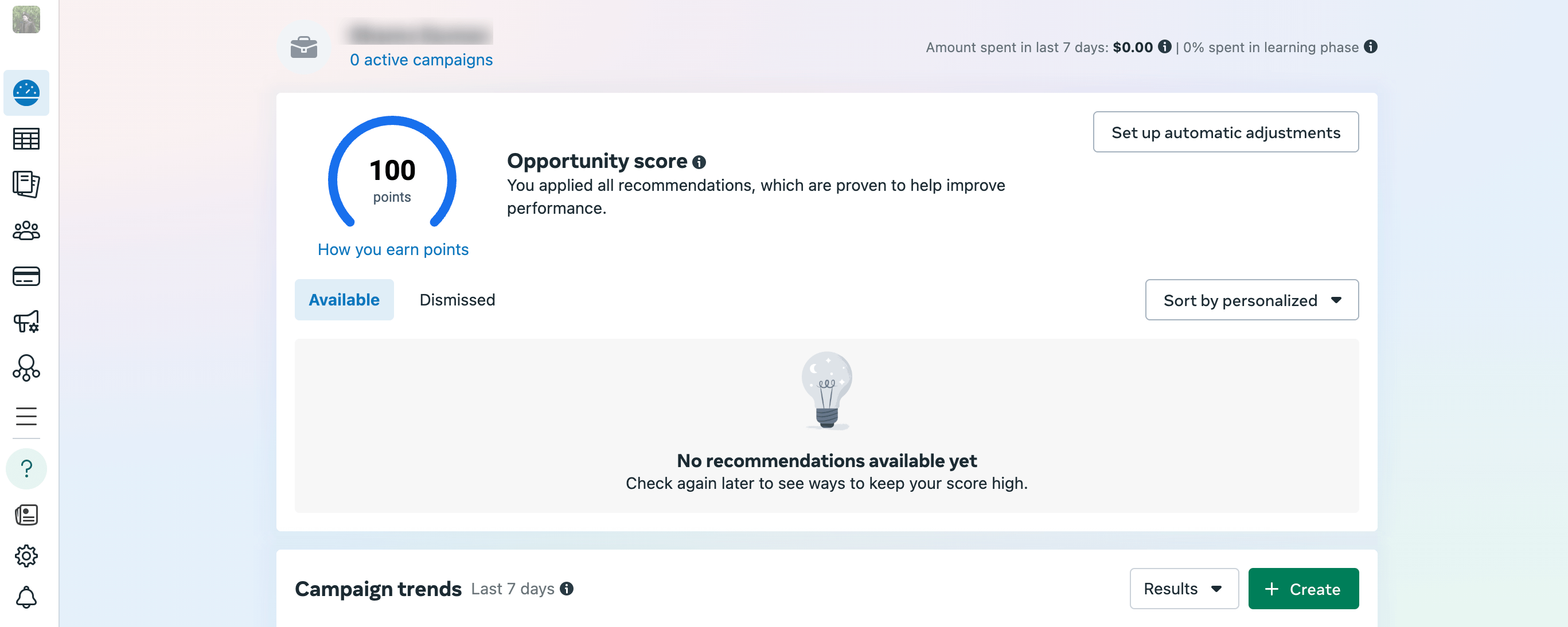
After navigating to Ads Manager and clicking 'Create,' the first step is to select an objective. This goal tells Facebook what you want to achieve. Common objectives include Awareness, Traffic, Engagement, Leads, App Promotion, and Sales. Your choice will influence how the platform optimizes ad delivery.
Step 2: Define Campaign Details and Budget
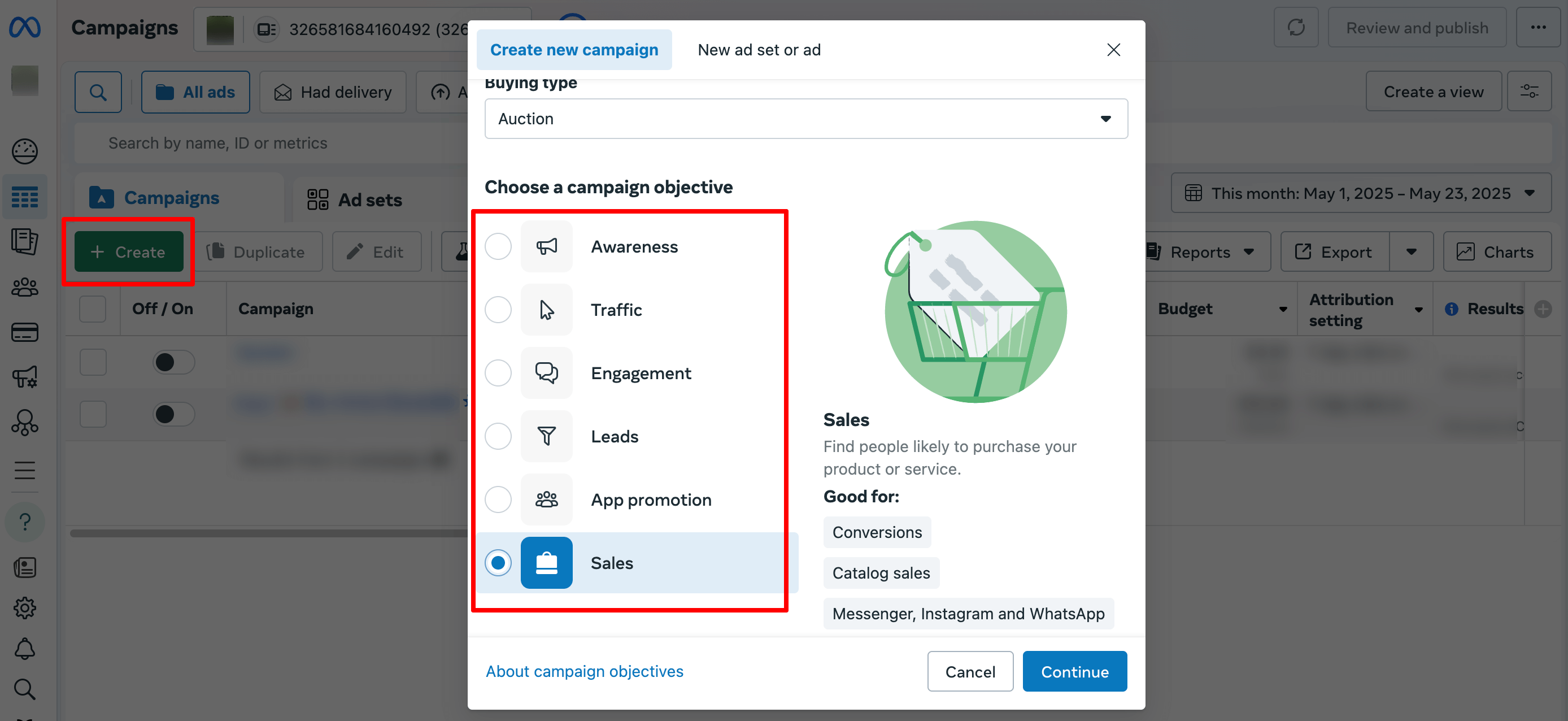
Next, give your campaign a descriptive name. In this section, you will also set your budget strategy. You can choose a daily budget (a set amount to spend per day) or a lifetime budget (a total amount for the entire campaign duration). For beginners, setting a campaign-level budget is often the simplest approach, allowing Facebook to allocate funds across ad sets for optimal performance.
Step 3: Configure the Ad Set
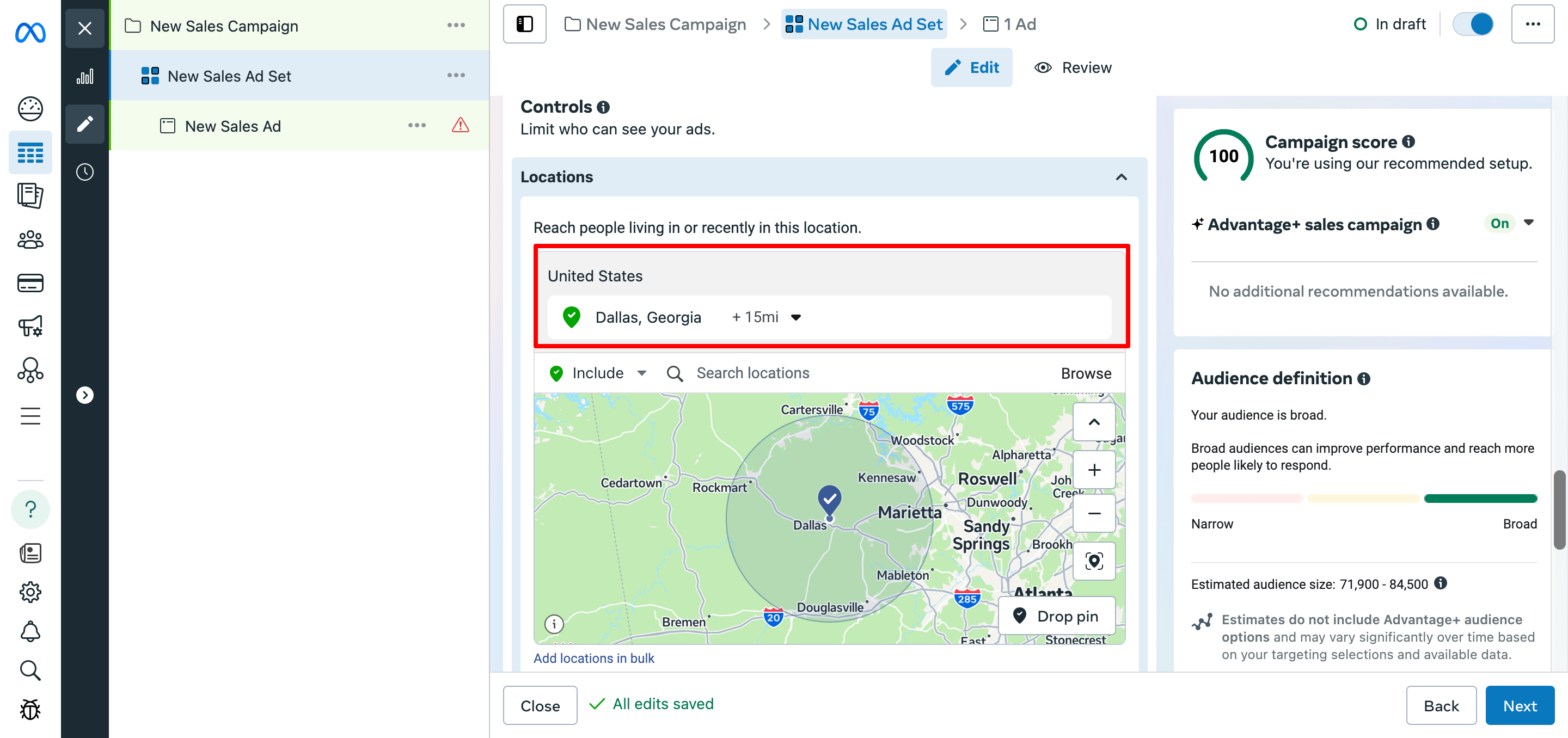
The ad set level is where you define your targeting, placements, and schedule. This includes selecting the conversion location (e.g., website, app, messaging), setting a start and end date, and defining your audience. You can target users based on location, age, gender, and detailed interests or behaviors.
Step 4: Select Placements
Placements are the specific locations where your ad will be shown, such as the Facebook Feed, Instagram Stories, Messenger, or the Audience Network. You can select 'Automatic Placements' to allow Facebook to show your ads where they are most likely to perform well, which is generally recommended for new advertisers.
Step 5: Design the Ad Creative
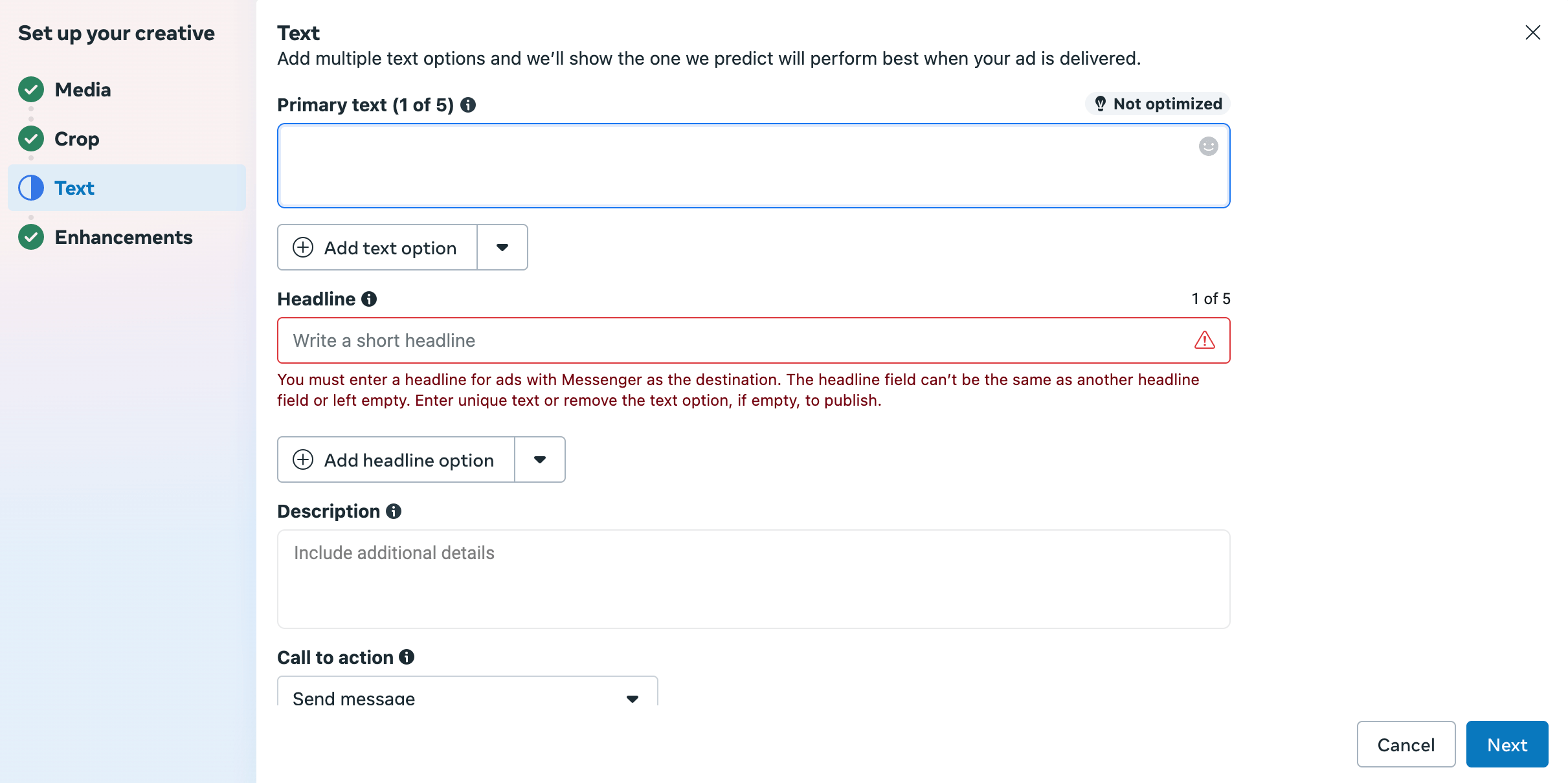
This is where you build the ad itself. You will select your Facebook Page and, optionally, an Instagram account to represent your business. Choose an ad format (single image, video, or carousel) and upload your media. Write a compelling headline, primary text, and a clear call-to-action (CTA) like 'Shop Now' or 'Learn More'. A preview tool will show how your ad appears across different placements.
Step 6: Review and Publish
Before going live, carefully review all your settings. Check the campaign objective, budget, audience targeting, ad copy, and visuals for any errors. Use the ad preview to ensure it looks correct on both mobile and desktop. Once you are satisfied, click 'Publish.' Your ad will then enter a review process before it starts running.
Pre-Launch Campaign Checklist
Use this final checklist to confirm your campaign is ready for publication. A thorough review can help prevent common errors and improve performance from the start.
- Objective: Is the selected campaign objective aligned with your business goal?
- Audience: Is the target audience clearly defined by location, demographics, and interests?
- Budget: Are the daily or lifetime budget and schedule set correctly?
- Creative: Is the ad copy clear and free of errors? Are the images or videos high-quality?
- Call-to-Action: Does the CTA button accurately reflect the action you want users to take?
- Links: If sending traffic to a website, does the destination URL work correctly?
- Compliance: Does the ad adhere to Facebook's advertising policies?
Related Tools
Frequently Asked Questions
How long does it take for a Facebook ad to be approved?
Once you publish an ad, it enters a review process to ensure it complies with Facebook's policies. This review typically takes anywhere from a few minutes to several hours. After approval, the ad will begin running according to the schedule you set.
Can I run Facebook ads without a website?
Yes, you can run Facebook ads without a website. You can create campaigns with objectives like Engagement to promote your Facebook Page, or message-based campaigns to encourage conversations without needing to send users to an external site.
What is the minimum budget for a Facebook ad?
The minimum daily budget can be as low as a few dollars, often starting around $1 to $5 per day depending on the campaign objective. Starting with a small budget is a practical way to test your ads and audience before committing more funds.
How do I stop or pause a running Facebook ad?
You can stop or pause an active ad at any time through the Facebook Ads Manager. Navigate to your campaigns, find the specific ad, campaign, or ad set you wish to pause, and use the toggle switch to turn it off or on.
Is it possible to target users in different countries?
Yes, Facebook's targeting options allow you to reach audiences globally. You can target specific countries, regions, or cities, making it possible to run international campaigns based on where your customers are located.
Key Terms
- Campaign Objective
- The primary goal you want to achieve with your advertising campaign, such as driving sales, generating leads, or increasing brand awareness. This selection guides Facebook's ad delivery optimization.
- Ad Set
- A group of ads that share the same budget, schedule, audience targeting, and placement settings. Campaigns are organized into one or more ad sets.
- Placements
- The specific locations where your ads can appear across Meta's platforms, including Facebook Feed, Instagram Stories, Messenger Inbox, and the Audience Network.
- Facebook Pixel
- A small piece of code installed on a website that tracks visitor actions. It helps measure ad effectiveness, build audiences for retargeting, and optimize campaigns for conversions.
- Ads Manager
- The all-in-one tool provided by Facebook for creating, managing, and analyzing ad campaigns across its family of apps and services.
- Ad Creative
- The visual and text components of an ad that users see, including the images, videos, headline, primary text, and call-to-action button.