
How to Use the Meta Ad Library for Competitor Research?
The Meta Ad Library is a public database of all active ads running across Meta's platforms, including Facebook and Instagram. This guide explains how to leverage this free tool for competitor analysis, creative inspiration, and strategic market research.

Sections
What is the Meta Ad Library?
The Meta Ad Library is a searchable collection of all advertisements currently running on Facebook, Instagram, Messenger, and the Audience Network. Initially created to increase transparency for political and issue-based advertising, it has evolved into an essential resource for marketers, advertisers, and researchers.

The library allows anyone to view the ad creatives, copy, and other details for active campaigns. This provides valuable insight into the advertising strategies of other brands in any given industry.
Information Available in the Ad Library
For a standard advertisement, the library displays several key pieces of information. This includes the ad's unique Library ID, its active status, and the date it started running. You can also see the specific platforms where the ad is active and view different versions if multiple exist. Crucially, it shows the complete ad creative (image or video), the ad copy, and the call-to-action button.
Special Ad Categories and Regional Differences
Ads related to social issues, elections, or politics are subject to stricter transparency rules and are stored for seven years. These ads include additional details like spending estimates and demographic reach. Similarly, due to EU regulations, ads served in the European Union are retained for one year and may display more information about targeting parameters.
How to Access and Search the Ad Library
Accessing the ad library is straightforward. You can navigate directly to the Meta Ad Library website or find it through a brand's Facebook Page. On any Facebook Page, go to the 'About' section and click on 'Page Transparency' to find a link to that brand's active ads in the library.
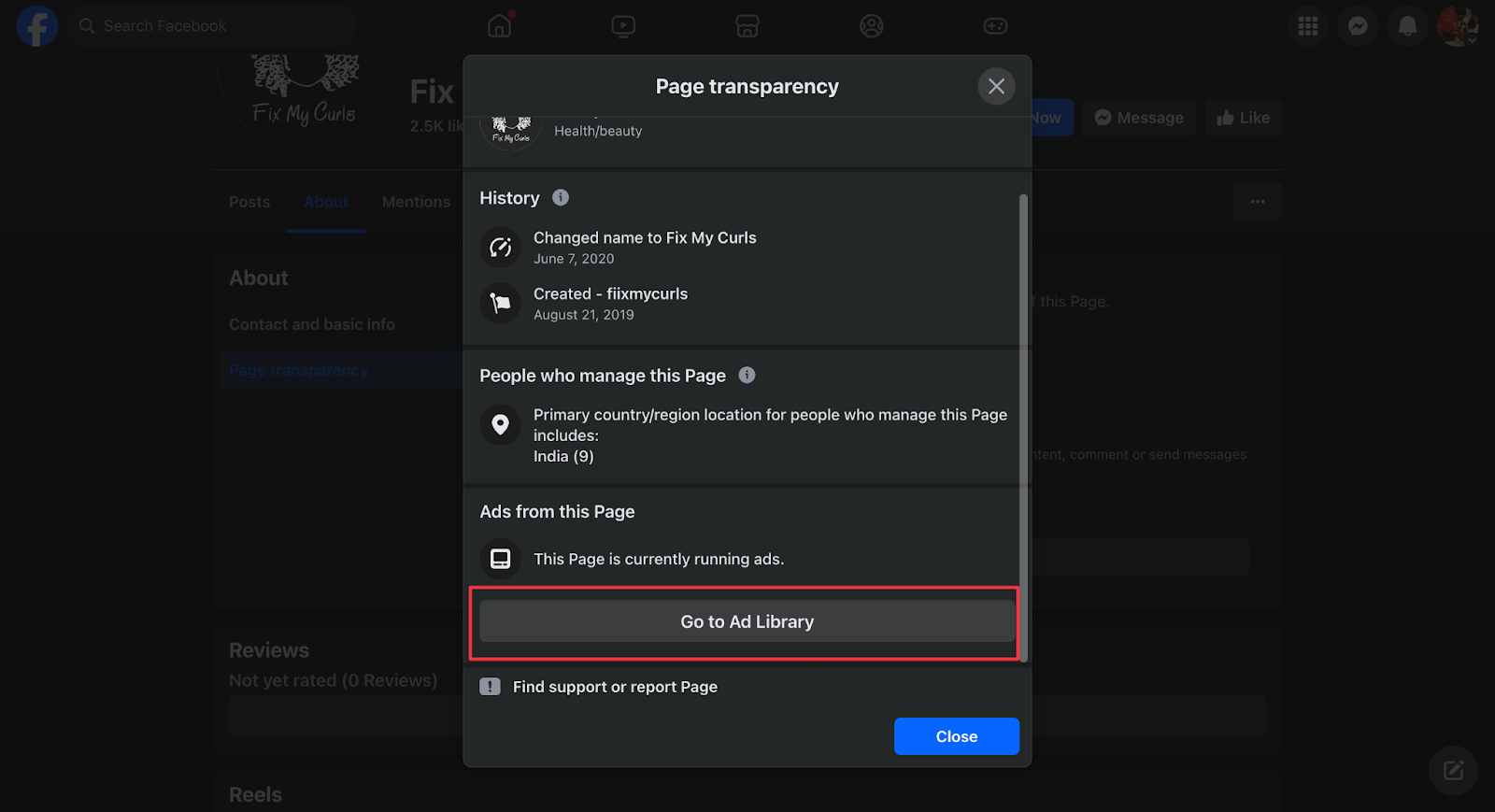
Once in the library, you can search by advertiser name or by keywords related to your industry. Filters are available to narrow down results by location, media type (e.g., images, videos), platform, and date range.
7 Strategic Ways to Use the Meta Ad Library
The Ad Library is more than a simple database; it's a tool for strategic analysis. Here are seven ways to incorporate it into your marketing workflow.
1. Analyze Competitor Advertising Strategies
The most direct use of the Ad Library is competitor analysis. Search for your competitors to see their currently active campaigns. This allows you to deconstruct their offers, promotional messaging, target platforms, and the types of creative they are using to engage their audience.
2. Identify High-Performing Ad Formats
If an ad has been running for a long time, it is likely performing well. Use the date filters to identify long-running campaigns in your niche. Look for common patterns in these successful ads, such as the prevalence of video content, user-generated creatives, or specific call-to-action phrasing.
3. Discover Market Gaps and Opportunities
By analyzing the collective advertising efforts in your industry, you can identify unmet needs or overlooked angles. If competitors are all using similar messaging, you may find an opportunity to stand out with a different value proposition. If most ads target Instagram, there might be an untapped audience on Facebook or Messenger.
4. Deconstruct Ad Copy and Messaging
Move beyond just looking at the visuals and analyze the ad copy. Study the headlines, primary text, and calls-to-action that competitors use. This can provide inspiration for your own copy, helping you refine your messaging to better resonate with your target audience.
5. Research Branded Content and Influencer Partnerships
The library also includes a section for branded content, showing posts with a 'paid partnership' label. You can search for a brand or creator to see their sponsored collaborations. This offers a surface-level view of a competitor's influencer marketing strategy and can help you identify potential partners.
6. Refine Searches with Advanced Filters
Utilize the library's robust filtering system to get highly specific results. Filter by media type to focus only on video ads, or set a date range to see campaigns launched for a specific holiday or event. Use keywords and search operators to find ads containing precise phrases or offers.
7. Streamline Research with Saved Searches
For recurring research tasks, such as monthly competitor check-ins, you can save your search parameters. The 'Save search' feature allows you to rerun complex queries with specific keywords and filters in a single click, improving your research efficiency over time.
Related Tools
When the Meta Ad Library isn't enough: meta ad library alternatives that fix the 90-day cap
The Meta Ad Library is free, but it has two structural limits that trip up every operator who relies on it for serious competitor research. First, non-political ads disappear once inactive — if a competitor paused a campaign last month, it's gone from the library entirely. Second, search is flat: you can filter by country and media type, but you cannot filter by engagement signals, creative longevity, or whether an ad is still scaling.
This is where a meta ad library alternative becomes necessary. Tools like dedicated ad spy platforms extend the archive window, add spend estimation layers, and let you filter by performance proxies — things Meta's native library simply doesn't expose. If you're looking for a direct alternative, AdLibrary specifically addresses the 90-day cap problem by maintaining a persistent cross-platform ad archive with AI enrichment on top, so you can search creative concepts across months of competitor activity without losing data when ads go inactive.
The practical workflow difference is significant. With the native library, you can see what a competitor is currently running. With a purpose-built alternative, you can see what they tested and killed, what they scaled, and how long each creative stayed live before fatigue set in. That timeline data is the signal that maps to actual budget allocation decisions — not the snapshot of whatever's active today.
For a systematic comparison of tools that plug these gaps, see meta ads intelligence platforms — it covers API access, archive depth, and pricing across the major options. If your workflow is built around building briefs from competitor research, the ad library research to creative brief in 60 minutes piece shows how to structure that workflow once you have access to deeper data. The scaling decisions with ad library signals guide explains which specific longevity patterns to look for before committing spend.
Bottom line: use the Meta Ad Library for what it is — a free transparency tool that gives you a real-time snapshot. Use a competitor ad analysis tool with proper archiving when you need history, volume data, or cross-platform coverage to make actual creative and bidding decisions.
Frequently Asked Questions
What is the Meta Ad Library?
The Meta Ad Library is a free, publicly available, and searchable database containing all ads currently active on Meta platforms, including Facebook, Instagram, Messenger, and the Audience Network. It was created to provide transparency in advertising.
Can you see how much a competitor spends on an ad?
For standard commercial ads, the Meta Ad Library does not show performance metrics like spend, reach, or impressions. However, for ads categorized under social issues, elections, or politics, the library provides an estimated spending range and demographic reach data.
How can I find old or inactive ads in the Ad Library?
The library primarily shows currently active ads. Inactive standard ads are generally not visible. The exceptions are political or issue-based ads, which are stored for seven years, and ads run in the EU, which are stored for one year after their last impression.
What platforms are included in the Meta Ad Library?
The Ad Library includes ads from all of Meta's major platforms. This covers Facebook (including Feed, Stories, and Marketplace), Instagram (including Feed and Stories), Messenger, and the Audience Network of third-party apps and websites.
Is the Meta Ad Library free to use?
Yes, the Meta Ad Library is completely free to use for anyone. You do not need a Facebook account to access and search the main library, making it an accessible tool for all marketers and researchers.
Is the Facebook Ad Library free?
Yes, the Facebook Ad Library (officially called the Meta Ad Library) is completely free to access and requires no account. You can search active ads across Facebook, Instagram, Messenger, and the Audience Network at no cost. The trade-off is coverage: non-political ads disappear once inactive, and there are no performance metrics or spend data for standard commercial ads. If you need archived ad data, spend estimates, or cross-platform intelligence beyond what Meta exposes, you will need a paid third-party tool.
Why is the Facebook Ad Library not working?
The most common reasons the Facebook Ad Library appears broken or returns no results: (1) Your country filter is set too narrowly — try switching to 'All' to see global results. (2) The advertiser name is misspelled or uses a slightly different brand name on their Page. (3) The ad you're looking for is inactive — the library only shows currently running ads for standard commercial campaigns. (4) Meta's servers are experiencing downtime, which happens occasionally. (5) A browser extension (particularly ad blockers) may be interfering with the library's JavaScript. Try an incognito window with extensions disabled. If none of those fix it, the most likely explanation is that the ad has simply gone inactive and is no longer in the library.
What is the best meta ad library alternative for competitor research?
The right alternative depends on what the native Meta Ad Library is missing for your use case. If you need deeper archive depth and historical ad timelines, AdLibrary maintains persistent cross-platform archives with AI-powered enrichment. If you need spend estimation, tools like Minea or BigSpy layer on budget signals. If you need API access for programmatic research, the Meta Ad Library API itself is worth evaluating. For a full breakdown of capabilities, pricing, and which gaps each tool fills, see the meta ads intelligence platforms guide.
Key Terms
- Ad Creative
- The visual component of an advertisement, which can be an image, a series of images in a carousel, a video, or another multimedia format.
- Ad Copy
- The written text within an advertisement, including the headline, main body text, and any descriptions that accompany the creative.
- Call-to-Action (CTA)
- A prompt, usually a button like 'Shop Now' or 'Learn More', that encourages the user to take a specific, desired action after viewing an ad.
- Landing Page
- The specific web page that a user is directed to after clicking on the call-to-action link in an advertisement.
- Branded Content
- Content created by an influencer, creator, or publisher that features a brand they have a commercial relationship with, typically disclosed with a 'paid partnership' label.
- Audience Network
- A network of third-party mobile apps and websites where Meta can display advertisements, extending the reach of campaigns beyond its own platforms.