
Meta Ad Library Search
Find any Meta ad in seconds. Search by brand, keyword, or industry across Facebook, Instagram, and 5 more platforms.

About the Meta Ad Library


What You Can Find in the Meta Ad Library
The Meta Ad Library is Meta's free transparency tool. It indexes every ad currently running across Facebook, Instagram, Messenger, and the Audience Network — searchable by anyone without an account. The URL is facebook.com/ads/library (unchanged despite Meta's 2021 rebrand from Facebook).
What Every Ad Shows
For each active commercial ad, you can see the full creative (image, video, or carousel), the primary text and ad copy, headline and description, call-to-action button text, the advertiser's Facebook Page name and logo, which platforms the ad runs on, the date it started running, its active/inactive status, and any A/B test variations the brand is testing simultaneously.
Political & EU Ads Reveal More
For political and social-issue ads, Meta provides additional transparency: estimated spending ranges (e.g., '$1,000–$5,000'), estimated impression ranges, demographic breakdowns by age and gender, geographic distribution of impressions, and the funding entity behind the ad. Political ads are archived for 7 years even after they stop running.
In the EU and UK, the Digital Services Act (DSA) requires even more data for all ads: targeting parameters showing how advertisers chose their audience, demographic reach breakdowns showing who actually saw the ad, beneficiary and payer information, and 1-year retention after last impression. EU researchers get significantly more useful data from the Meta Ad Library.
What's Missing for Professional Research
The Meta Ad Library doesn't show any performance metrics for commercial ads — no impressions, clicks, CTR, engagement, or spend data. There's no historical archive: ads disappear instantly when paused. No save, export, or organize functionality. No cross-platform coverage. No monitoring alerts. No API for commercial ads.
For a step-by-step guide with advanced search operators and filter techniques, read our Meta Ads Library complete research guide.
What AdLibrary.com Does That the Meta Ad Library Can't
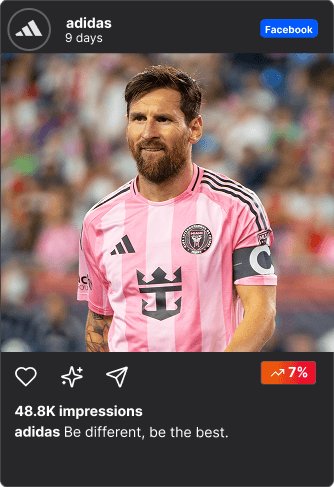
Every ad, one feed
Browse ads like a social feed. See platform, impressions, runtime, and creative — at a glance.



All platforms. One search.
Meta, Google, TikTok, YouTube, X, LinkedIn, Snapchat, Pinterest — search them all from a single search bar.
Research that pays for itself
Teams using ad library find winning creatives faster and stop wasting budget on guesswork. Typical results after 3 months of using adlibrary.com:
0x
ROAS
-0%
Ad spend
Save. Tag. Reuse.
Build your swipe file. Organize winning ads into folders and never lose a reference again. (You can even share with non-users, like your clients)
Meta Ad Research at Scale
Individual ad lookups work in the Meta Ad Library. But the moment you need to scale — tracking 10+ competitors, monitoring new campaign launches, building a reference library of winning creative, comparing strategies across platforms — the official tool hits a wall.
AdLibrary.com is built for that scale:
- Automatic competitor monitoring. Instead of manually checking the Meta Ad Library daily, set up monitoring for specific brands and get notified when they launch new ads or change creative strategy.
- Performance signals. The Meta Ad Library shows every ad but can't tell you which ones work. AdLibrary.com adds estimated impression data and ad longevity signals to separate winners from noise.
- Cross-platform view. A brand's Meta strategy is just one channel. See their Facebook, TikTok, YouTube, Google, and LinkedIn ads side by side. This cross-platform context is impossible to get from the Meta Ad Library alone.
- Living swipe file. Save Meta ads to organized collections, tag them by theme, campaign type, or client, add notes, and share with your team. Unlike screenshots in folders, your research stays structured and searchable.
- API integration. Pull Meta ad data into your own dashboards, client reports, CRM pipelines, or AI agent workflows. Automate the research that currently takes hours of manual browsing.
See the Meta Ad Library — Upgraded
Meta Ads + Every Other Platform
Type any brand name, keyword, or URL into AdLibrary.com. See every ad they're running across Facebook, Instagram, TikTok, YouTube, Google, LinkedIn, and mobile ad networks — all in one search. Filter by platform, country, ad format, date range, and estimated performance. Save what you find to collections. Share with your team. Export for reporting.
Build the permanent competitive intelligence archive that the Meta Ad Library can't offer — across every platform your competitors advertise on, with performance signals the official tool doesn't provide.
Our Ad Database — Way Bigger Than Meta's
200M+ Google ads
largest database online from Google Ads Transparency Center (incl. YouTube)


50M+ Meta ads
Facebook, Instagram & Threads from the Meta Ad Library



Mobile and Gaming ads
We also have a big native network for checking mobile and native gaming ads and advertorials



Tiktok, X and Pinterest Ads
For absolute Gen Z social media capture


Constantly thriving to be the best
We are constantly improving our platform to give you all the results and actionable insights. We already had Linkedin integrated and will bring it back and Snapchat will be integrated soon. And we will be the first to integrate ChatGPT ads as soon as they release.



Teams Trust AdLibrary.com Over the Meta Ad Library
Agencies managing client competitive reports, growth teams optimizing creative strategy, and e-commerce brands researching winning ad formats all use AdLibrary.com as their daily intelligence tool. It replaces the workflow of checking the Meta Ad Library, Google Ads Transparency Center, TikTok Creative Center, and LinkedIn Ad Library separately — one search, one interface, one archive, one team workspace.
Related Pages
- Meta Ads Library: Complete Research Guide — Search tips, 7 use cases, common mistakes.
- Facebook Ads Library Guide — Detailed Facebook ad research guide.
- Facebook Ad Library API
- How to Analyze Facebook Ads
- How to Spy on Competitor Ads
- Best Meta Ad Library Alternatives
- AdLibrary vs Meta Ad Library
- Instagram Ad Library
- TikTok Ad Library
- Google Ads Library
Our Ads Library Pages
What our customers say
“Found a competitor's entire funnel in 2 minutes. New campaign launched same day.”
Media Buyer , running $500k/month
Start Searching Meta Ads Now
Try the better Meta Ad Library
Meta Ad Library — Quick Answers
What is the Meta Ad Library?
Meta's free, public transparency tool showing every active ad on Facebook, Instagram, Messenger, and the Audience Network. Available at facebook.com/ads/library without any account or login. Originally launched as the Facebook Ad Library in 2019, rebranded to Meta Ad Library in 2021.
Is it the same as the Facebook Ad Library?
Yes — identical tool, just rebranded when Facebook became Meta in October 2021. The URL is still facebook.com/ads/library and the functionality hasn't changed. See our Facebook Ads Library guide for the full breakdown.
Can I search Meta ads on AdLibrary.com?
Yes. AdLibrary.com indexes 50M+ Facebook and Instagram ads alongside 200M+ ads from Google, YouTube, TikTok, LinkedIn, and mobile ad networks. One search covers all platforms — no need to check each library separately.
Do ads disappear from the Meta Ad Library?
Yes — commercial ads are removed immediately when paused or stopped. There's no archive for commercial ads. Political ads are kept for 7 years, and EU/UK ads are retained for 1 year per the DSA. On AdLibrary.com, all ads are permanently archived.
Can I get performance data?
Not from the official Meta Ad Library — it shows zero performance metrics for commercial ads. The best free proxy is ad longevity: ads running for weeks or months are likely profitable. AdLibrary.com adds estimated impression data and longevity signals.
Can I save ads from the Meta Ad Library?
The official tool has no save, bookmark, or export feature. Every session starts from scratch. AdLibrary.com lets you save to collections, tag by theme or client, add notes, and share with your team.