
A Guide to Using Meta Ad Library for Competitive Intelligence
Transparency tools allow marketers to view active advertisements across social platforms. This guide explores how to leverage the Meta Ad Library for competitor analysis and creative research.
Sections
In the landscape of digital advertising, visibility is a strategic advantage. Rather than relying solely on internal reporting dashboards or waiting for agency updates, marketers can access public ad transparency databases to gain immediate insight into live campaigns. The Meta Ad Library—often referred to as the Facebook Ad Library—is the primary resource for this purpose, offering open access to advertisements currently running across Facebook, Instagram, Messenger, and the Meta Audience Network.
For performance marketers, creative strategists, and growth teams, the Meta Ad Library functions as a real-time competitor research tool. It allows anyone to analyze active ad creatives, messaging strategies, and campaign positioning without requiring a login or business account.
 Meta Ad Library interface showing active Facebook and Instagram ads in a searchable grid"
data-placeholder="meta-ad-library-hero.webp"
loading="lazy"
/>
Meta Ad Library interface showing active Facebook and Instagram ads in a searchable grid"
data-placeholder="meta-ad-library-hero.webp"
loading="lazy"
/>
The Strategic Value of Ad Transparency Tools
Ad libraries were originally introduced to improve transparency in political and social issue advertising. Over time, these databases evolved into powerful intelligence tools for commercial advertisers. Today, the Meta Ad Library enables marketers to audit competitor campaigns, monitor creative trends, and assess market positioning in real time.
Instead of speculating about what competitors are testing, teams can review live ads directly. The platform displays active creatives, copy variations, headlines, call-to-action buttons, and landing page URLs. This visibility transforms competitor research from guesswork into structured analysis based on observable market behavior.
Importantly, access to the Meta Ads Library is unrestricted. Anyone with a web browser can explore active advertisements without logging into a Facebook account, making it one of the most accessible ad research tools available.
How to Use the Meta Ad Library for Competitor Research
Accessing and analyzing ad data follows a straightforward workflow. Below is a standardized process for reviewing active campaigns from any advertiser.
- Step 1: Access the Meta Ad Library. Navigate to the official Meta Ad Library URL to begin your research session.
- Step 2: Select the appropriate country and category. Choose the target country relevant to your market and set the Ad Category to All Ads to view commercial campaigns.
- Step 3: Search for the advertiser or brand name. Enter the exact Facebook Page or business name in the search field and select the correct entity from the dropdown results.
- Step 4: Filter and sort results. Use available filters to refine results by ad status (Active/Inactive), platform placement (Facebook, Instagram, Audience Network), and media type (Image, Video).
- Step 5: Inspect individual creatives. Click on See Ad Details to review full ad copy, headline variations, call-to-action buttons, and destination URLs.
This structured approach ensures consistent and repeatable competitor analysis across different verticals and geographic markets.
Advanced Filtering, Keyword Research, and Trend Analysis
Beyond brand-specific searches, the Meta Ad Library supports keyword-based queries. This feature enables broader industry research, helping marketers identify creative trends, recurring messaging angles, and common promotional structures.
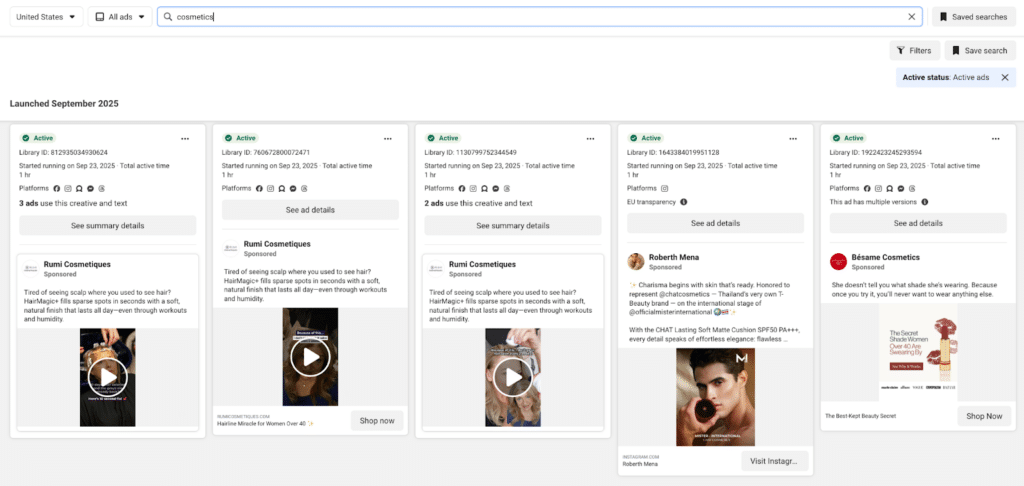 Meta Ad Library showing filtered results by country and media type"
data-placeholder="keyword-search-interface.webp"
loading="lazy"
/>
Meta Ad Library showing filtered results by country and media type"
data-placeholder="keyword-search-interface.webp"
loading="lazy"
/>
By entering relevant industry keywords, marketers can uncover how multiple advertisers approach similar products or services. Combining keyword searches with media-type filters (e.g., video-only) allows teams to isolate high-engagement formats such as short-form video or carousel ads.
Applying date filters helps identify long-running campaigns, which often indicate sustained performance. While the Meta Ad Library does not provide performance metrics like clicks or ROAS, ad longevity can serve as a proxy signal for campaign effectiveness.
Comparing Ad Transparency Platforms Across Networks
While the Meta Ad Library is one of the most comprehensive ad transparency tools, effective competitor research often requires cross-platform analysis. Several major advertising networks provide their own transparency centers.
- Google Ads Transparency Center: Covers Search, Display, and YouTube ads. It provides advertiser verification details and geographic distribution data.
- LinkedIn Ad Library: Useful for B2B competitor analysis, allowing users to review active sponsored content campaigns.
- TikTok Creative Center: A key resource for short-form video analysis and trend tracking, particularly in performance-driven consumer markets.
- X (Twitter) Ads Repository: Offers ad visibility within the X ecosystem, with feature availability varying by region.
Cross-referencing these platforms ensures a more complete understanding of a competitor’s full-funnel advertising strategy rather than relying solely on Meta placements.
Common Mistakes When Analyzing Competitor Ads
Misinterpreting data from the Meta Ads Library can lead to flawed conclusions. Avoid the following errors when conducting competitor research:
- Mistake 1: Assuming visibility equals profitability. An active ad is not necessarily a profitable ad. Look for creatives that have been running for extended periods as potential indicators of success.
- Mistake 2: Ignoring country filters. Advertising strategies vary by region. Always verify that you are analyzing ads relevant to your target market.
- Mistake 3: Overlooking inactive campaigns. Reviewing inactive ads can provide insight into seasonal promotions, product launches, or discontinued offers.
- Mistake 4: Copying creative without strategic context. Replicating visuals or messaging without understanding the underlying audience and value proposition often leads to poor results.
- Mistake 5: Neglecting multi-platform strategy. A brand’s Meta ads represent only one component of its broader digital advertising ecosystem.
Frequently Asked Questions About the Meta Ad Library
Do I need a Facebook account to use the Meta Ad Library?
No. The platform is publicly accessible and does not require a login or personal Facebook profile.
Does the Meta Ad Library show ad spend or performance metrics?
For standard commercial ads, detailed performance metrics such as impressions, clicks, or ROAS are not disclosed. However, political and social issue ads often include spend ranges and impression data for regulatory transparency.
Why can’t I find ads for a specific company?
If the advertiser is not currently running campaigns, they may not appear under the default Active filter. Confirm the correct country selection and ensure the business name is entered accurately.
Can I see historical ads in the Meta Ad Library?
In most regions, only currently active commercial ads are visible. Political and social issue ads may be archived for extended periods in accordance with transparency regulations.
Limitations of the Native Meta Ad Library
While the Meta Ad Library is free and accessible, it has significant limitations:
- No engagement metrics: You can't see CTR, likes, or reach estimates.
- Limited filtering: Can't filter by CPM tiers, date ranges, or creative formats effectively.
- No cross-platform comparison: Only shows Meta ads, not Google, TikTok, or others.